
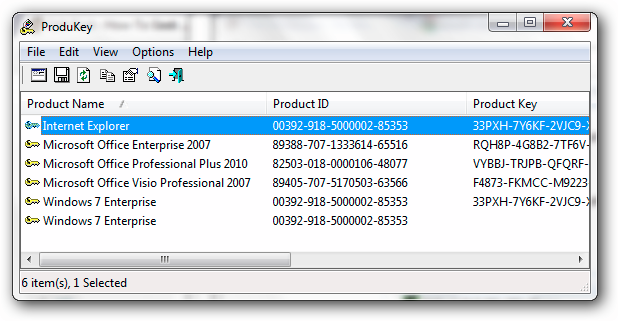
Imagine for a moment that you've decided to reinstall your preferred version of Windows, but the product key detail has vanished into thin air. The famous certification sticker stuck to your computer can turn to dust after a couple of years, and the truth is that Microsoft doesn't help in cases like this. The best option is to extract the key from the Registry with a utility like ProduKey, developed by the well-known and always reliable NirSoft.

As we know well, the Redmond giant modified several aspects of its activation system upon the release of Windows 10. The creation of a "hash" based on the installed hardware should have eradicated the need for a product key, but Microsoft's vision never reached that point. One of the many complaints made by users during the first days of Windows 10 on the market was the lack of support for using Windows 7 and Windows 8.1 keys in the activation process.
At first, if a user wanted to do a clean install, they had to "step on" their operating system with a Windows 10 installation, allow the hash generation, purge their hard drive and finally reinstall Windows 10 so it activates correctly. In short, "a real mess". In the end, Microsoft had no choice but to appeal to logic and allow the use of keys intended for Windows 7 and Windows 8.1… which brings us to ProduKey.
Recover Your Windows Product Key

The ProduKey program from NirSoft can extract the existing product key from your Windows installation. Support extends to several Office products, and programs belonging to names like Adobe and Autodesk, but Windows has always been ProduKey's main target. Like other NirSoft developments, the process is reduced to unzipping the zip file containing the main executable, and opening it using administrator privileges (otherwise, it's likely that the Windows key won't appear). Once done, take note of the key.
ProduKey works on all versions of Windows from Windows 98 onwards. The only exceptions are Windows 7 and Windows 8.x that have been activated via volume licensing. ProduKey has all the secondary commands you'd expect from NirSoft software, and since it has no local dependencies, it can be loaded on a USB drive without problems. In other words, the perfect solution if you've lost your operating system's key.


